

Lichess StudiesAuthor: FM Vidar Grahn
Lichess studies are an awesome tool for learning, and the best part is they’re completely free! But because it’s community-driven, a lot of what's out there (honestly, most of it) is pretty low-level or straight-up slop. To save you the digging, I’ve linked my own personal collection of studies in this website's Lichess study index, along with a fair share of hand-picked favorites from other creators.
Beyond just learning from other people, though, creating your own studies can be incredibly useful. Whether it's for personal use or sharing lines with your friends, I think it is, honestly, probably better than storing files on ChessBase. Lichess is free, has a much cleaner learning curve, way more convenient and you can easily access your studies right from your phone.
How to Create Your own Lichess Studies
Studies can be found under "Learn" in the Lichess menu:
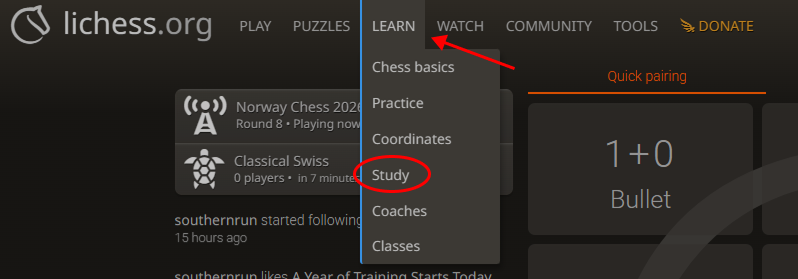
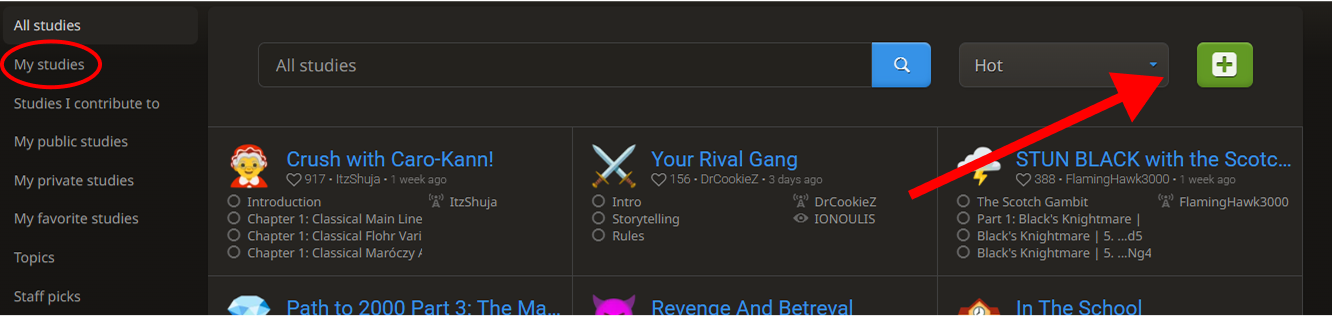
To create a new study press the big green plus icon. You can find all the studies you've made under "my studies" to the left.
Then you will see this pop-up window:
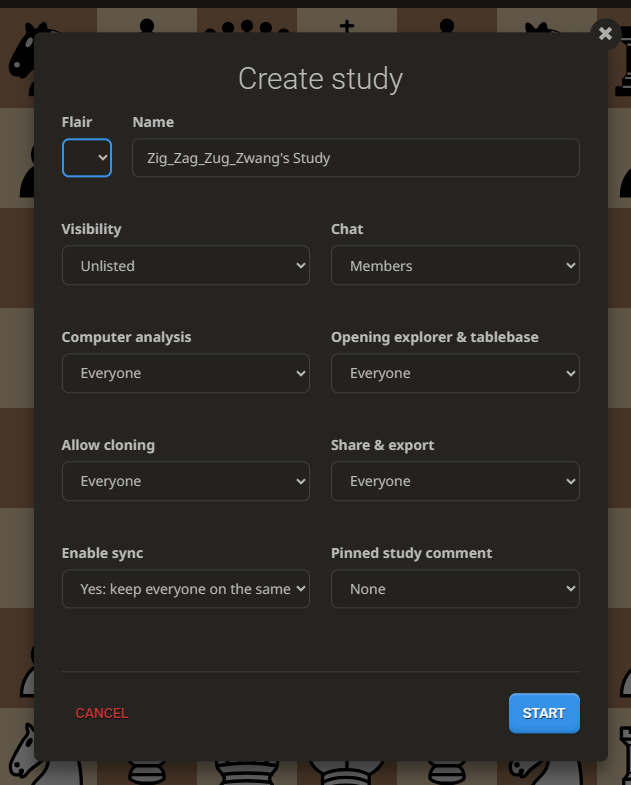
Flair is completely optional, it’s just the emoji next to your study title. It’s great for aesthetics or just making a specific study stand out from the rest.
Visibility controls who can see your work.
- Invite Only: Use this if it's top-secret opening prep.
- Unlisted: The study is hidden from the public, but anyone with the link can still access it.
- Public: Everyone can see it on your profile, and it can even show up on the main Lichess study page if it garners enough likes.
Chat decides who is allowed to talk in the chatbox. The default is "members," which includes everyone you invite to the study, whether they are just viewers or contributors (people who can edit lines and comments). You can also set it to nobody, just yourself, or everyone.
Allow cloning controls whether people can copy-paste your study to create an identical version of their own. If you're just making the study for yourself, this doesn't really matter. But if you're creating a study for the public, it's usually best to keep this off to prevent plagiarism.
Share and export determines who can copy or download the PGN of your study. Keeping this enabled is great if you want to treat your study like a course that people can download and take with them.
Enable sync is probably the most confusing setting. When enabled (which is the default), everyone viewing the study sees the exact same board in real-time. Every move, every arrow, etc. This is awesome if you're on a call with a friend or doing a coaching session with a student. However, if multiple people are trying to study different lines simultaneously, it can get pretty annoying, so you might want to turn it off then.
Pinned comment is pretty much exactly what it sounds like. It pins a permanent comment underneath the chessboard. It’s perfect if you’re making a public study and want to link external resources, credit material, or leave important instructions.
Next up, you’ll need to create your first chapter. Here’s what that looks like:
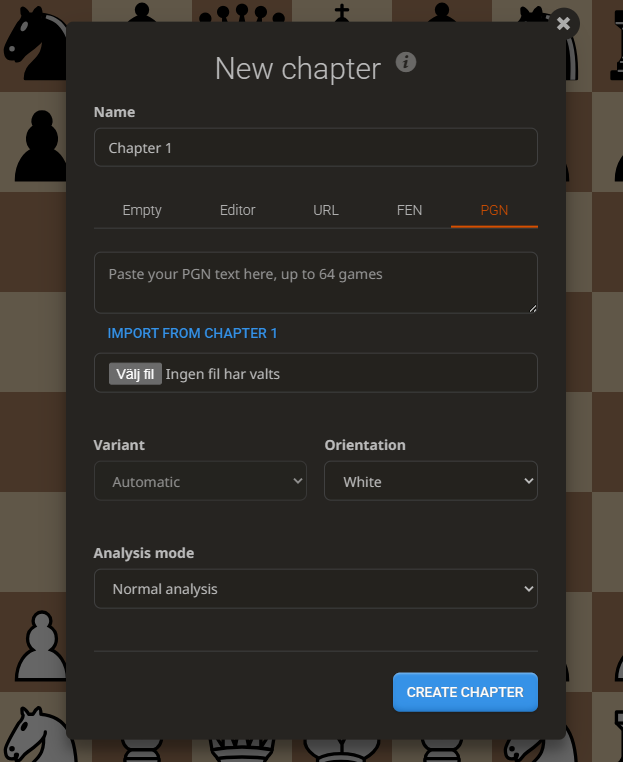
You’ll see 5 different tabs to get your chapter started. If you just want a standard game starting from move one, you don't have to change a thing, the default setting handles it. Otherwise, here is how the options break down:
Empty just gives you the starting position. Frankly it's unnecessary because you can simply avoid filling in the PGN slot, but I digress.
Editor is the best option if you want to set up a highly specific position. It lets you manually drag pieces exactly where you want them and clear off the ones you don't need.
URL This lets you paste the link of any active Lichess game to pull it directly into your study. It’s super handy if you want to compile a collection of your own online blitz or rapid games to analyze later.
FEN is basically a line of text code that represents a specific position (for example: r2qkb1r/pp3ppp/2n1pn2/2pp1b2/3P1B2/2P1PN2/PP1N1PPP/R2QKB1R w KQkq - 0 7). This is incredibly useful if you want to copy a position from a game or website without manually placing all the pieces.
PGN is the most popular and useful way to import material. A PGN file is a text format that contains all the moves of a game, and it often includes engine annotations, written comments, and metadata like player names or time controls.
Once you’ve picked your method, just make sure to select the correct orientation at the bottom (White or Black) so the board flips the right way!
Interactive Lesson Mode
If you plan to use your Lichess studies as learning material for other people, this mode is an absolute game-changer. It essentially turns your chapter into a custom puzzle or quiz, forcing the viewer to guess the correct moves while receiving feedback along the way.
To turn it on, just change Analysis mode to Interactive lesson when creating or editing your chapter.
Once activated, your setup screen will look like this:
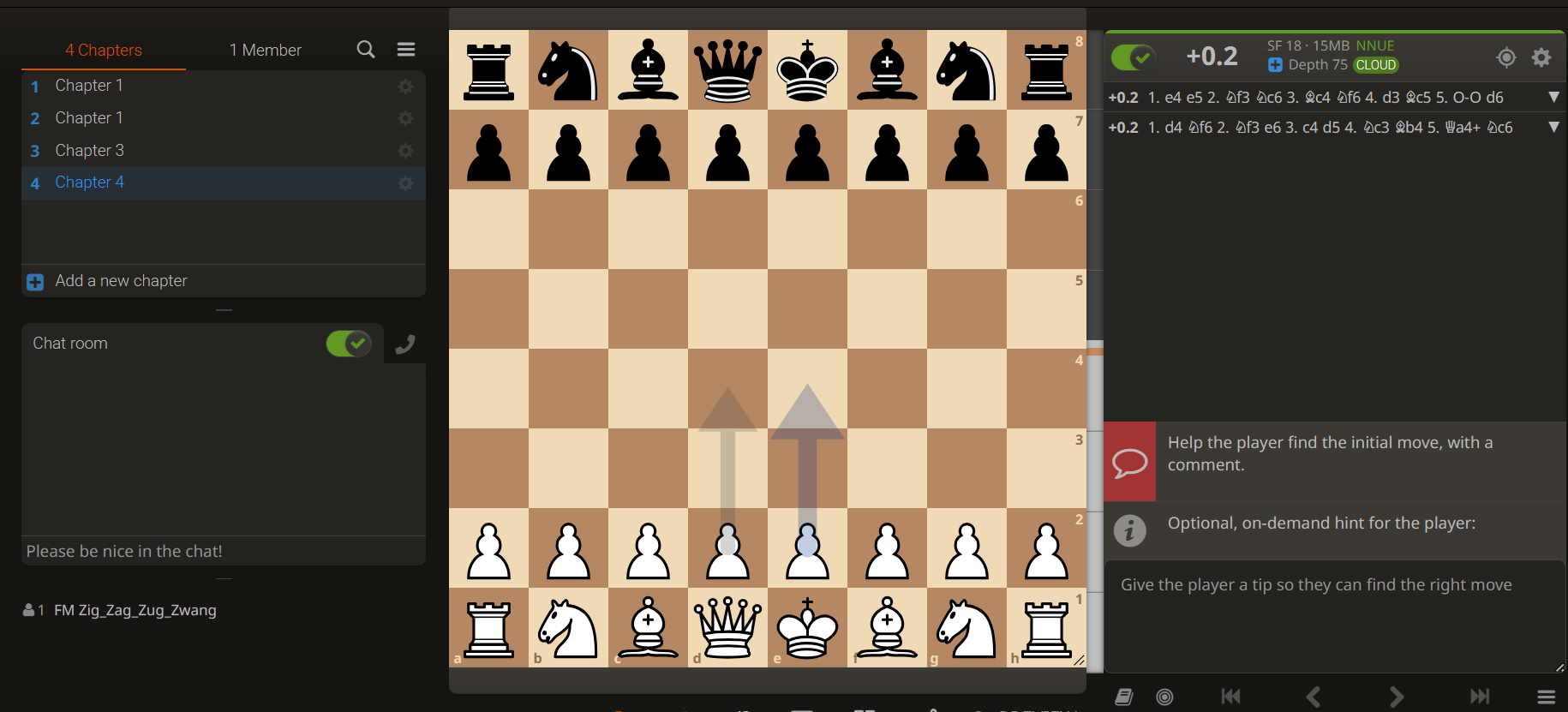
At first glance, it looks just like a normal chapter, but there are two key differences designed to help you guide a student:
- The Opening Comment: Lichess will explicitly prompt you to add a comment on move one. Use this to give context, explain the goal of the position, or tell the student exactly what they should be looking for.
- The Hint Box: This is completely optional. If you write a hint here, a "Get a Hint" button will appear for the student if they get stuck trying to find the right candidate move.
To make sure everything feels right before you share it, look just below the board next to the "Share & Export" tab. You'll see a Preview button. Click that, and you can test out the chapter from the student's exact perspective.
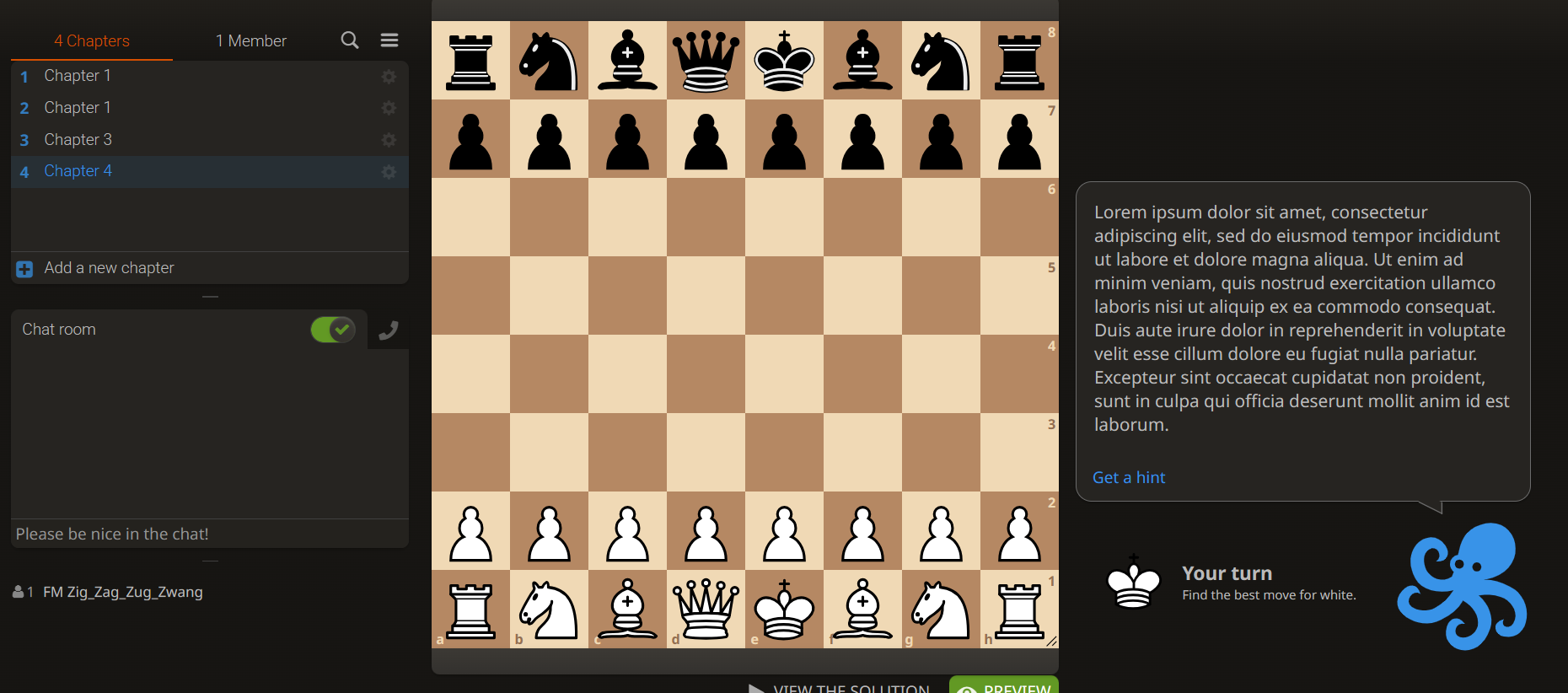
How to Make an Engaging Lichess Study
If you want to share your chess knowledge, Lichess studies are easily one of the best ways to reach a massive audience of chess enthusiasts. Having created over a dozen popular studies myself, totaling well over 15,000 likes and reaching hundreds of thousands of views, I’ve developed a pretty solid blueprint for how to structure a study so it’s genuinely engaging and highly educational.
My number one piece of advice is to make your chapters interactive. While standard analysis chapters definitely have their place, I've personally found way more success with interactive lessons. Most players prefer active learning over passive reading, and they’re significantly more likely to actually remember a line or a positional concept if they have to physically click and make the moves themselves.
Why make lichess studies?
I am one of the very few titled players players to consistently build high quality Lichess studies, and honestly, I don't think most coaches or creators realize just how powerful they can be. At first glance, it might seem counterproductive to build chess courses for free when you could realistically put them behind a paywall. But here’s the secret: a popular Lichess study is one of the best organic marketing funnels you can possibly create.
Making a study that pulls in 2,000 likes is completely achievable, especially for titled players. While Lichess doesn’t publicize view counts, if you map that engagement to a platform like YouTube, 2,000 likes easily translates to 40,000 to 50,000 views. Even if the like-to-view ratio on Lichess is slightly higher, you're still getting eyes on your work from a massive, highly targeted audience of chess enthusiasts.
You can leverage this reach to promote your own projects, coaching services, or community. For example, I used my studies to drive traffic to my Discord server, which grew to over 1,700 members pretty quickly. On top of that, it opens up sponsorship opportunities; I’ve had chess brands reach out and pay me a pretty decent paycheck just to include a promo link in my study.
What Topic Should My Lichess Study Be About?
Lichess studies allow for pretty much any chess topic. Opening guides are always highly popular, but in my experience, they take a massive amount of time and effort to build properly. Beginner guides are another great option. However, I’ve found that the absolute best approach is to pick a highly specific topic and pack it full of interactive exercises.
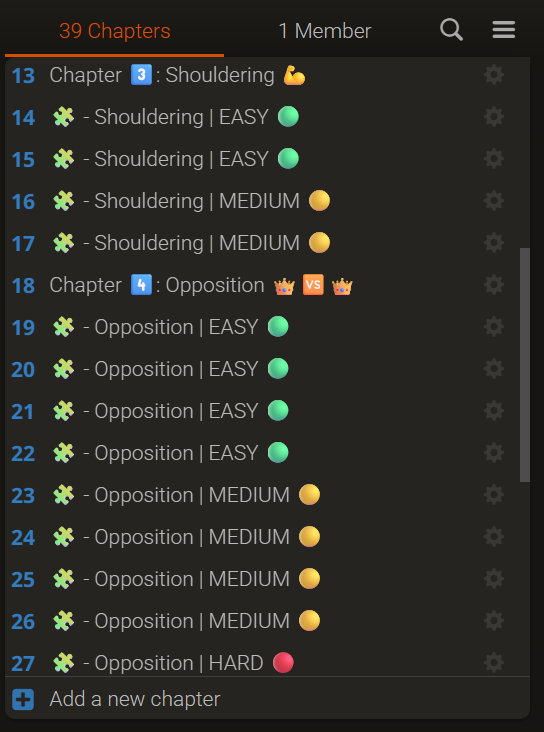
If your study relies on puzzles or exercises, I highly recommend breaking them down by skill level. For example, when I made a study on pawn endgames, I divided the chapters into "Easy," "Medium," and "Hard."
- Easy was aimed at pure beginners.
- Medium covered concepts that were a bit too advanced for a beginner but manageable for intermediate players.
- Hard featured deep, complex puzzles that even I struggled to solve.
Structuring your study this way gives it a much wider appeal, making it valuable for a casual player while still offering a genuine challenge to advanced players who stumble across it:
That being said, my absolute favorite thing to write about isn’t what you’d find in a standard chess course, it’s just straight-up text and practical advice on how to actually improve at the game. I love including chapters dedicated to how to study chess, how to think during a real game, and which resources are actually worth your time.
You can find a bunch of my own studies focused on this exact kind of advice right in the Lichess Study Index on this site. I highly recommend checking them out, not just for topic inspiration, but to see exactly how to handle the overall structure and design.
How to Get People to See Your Study
This is the tricky part. For people to notice your study, it needs to hit the main Lichess study homepage where all the "hot" and trending studies live. To land a spot there, you need to rack up a solid wave of likes early on.
The Publishing Trick
The first step comes down to exactly how you publish your work. When you're building a new study, keep it set to Invite Only or Unlisted while you work on it. Once you're completely finished, don't just flip the setting to public. Instead, clone the study! This creates a brand-new, untouched version with all your material ready to go, giving you a fresh timestamp for the Lichess algorithm. This little trick is incredibly important.
Getting Initial Traction
To get those crucial first few likes, you need a quick burst of promotion. If you're starting from scratch I highly recommend using Lichess blogs. Write an engaging blog post covering the same topic and embed your study link directly inside it. Just keep in mind that this is significantly easier if you're a titled player, as titled blogs tend to get a massive boost from the Lichess blog algorithm.
There are also plenty of amazing Lichess study communities that will happily help you promote your work. The most prominent one is probably Study Creators & Friends but you also have groups like the Study Resource Team that are great for getting your material out there.
Building momentum takes time. Your first couple of blogs and studies might not gain crazy traction right away. But chess creators know that consistency is key, as soon as you land that first successful hit, the algorithm starts working in your favor, and growing your audience gets way easier going forward.